Music Tools for Windows
 Music Tools for Mac


- 0. Dedrm Microsoft Store Kindle App (MSIXKFXArchiver.exe + KFX-input Plugin)
- 1. Dedrm Kindle for PC 2.9.1 with Calibre KFXArchiver.exe + Dedrm Plugin V10.0.20
- 2. Dedrm Kindle for PC 2.8.0 with Calibre Kindlekeyextractor.exe + Dedrm PluginV10.0.15/14
- 3. Dedrm Kindle device with Calibre dedrm plugin V10.0.18
- 4. Troubleshooting: Calibre Kindle KFX Key Extractor Not Working
- 5. Is there an easier way to remove Kindle DRM in 2026?
Calibre Kindle DeDRM Plugin: Convert Kindle to KFX-ZIP file and Remove Kindle DRM 2026
How to remove kindle drm for free in 2026? The latest DeDRM plugin for Calibre supports kindle books downloaded k4pc 2.9.1 and Kindle for Windows 11.
With help from the developer Satsuoni, the latest DeDRM plugin -- KFXArchiver.exe and MSIXKFXArchiver.exe is finally working properly. Unlike the previous versions of the DeDRM or NoDRM fork (v10.0.9), this new release includes a crucial tool called KFX Key Extractor, which is essential for retrieving cryptographic keys from Kindle books downloaded via Kindle for PC version 2.8.3. As for MSIXKFXArchiver.exe, it can decrypt Microsoft Store Kindle books directly.
In the following part, I will show you how to dedrm kindle books with different Calibre dedrm plugin tools.
0. Dedrm Microsoft Store Kindle App (MSIXKFXArchiver.exe + KFX-input Plugin)
Step 1: Download Kindle books first via MS Kindle app(Kindle for Windows).
Step 2: Download Dedrm Plugin and extract kindle books as kfx-zip file.
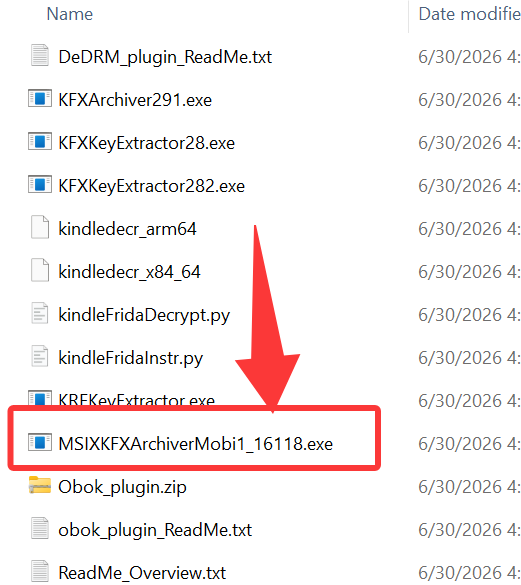
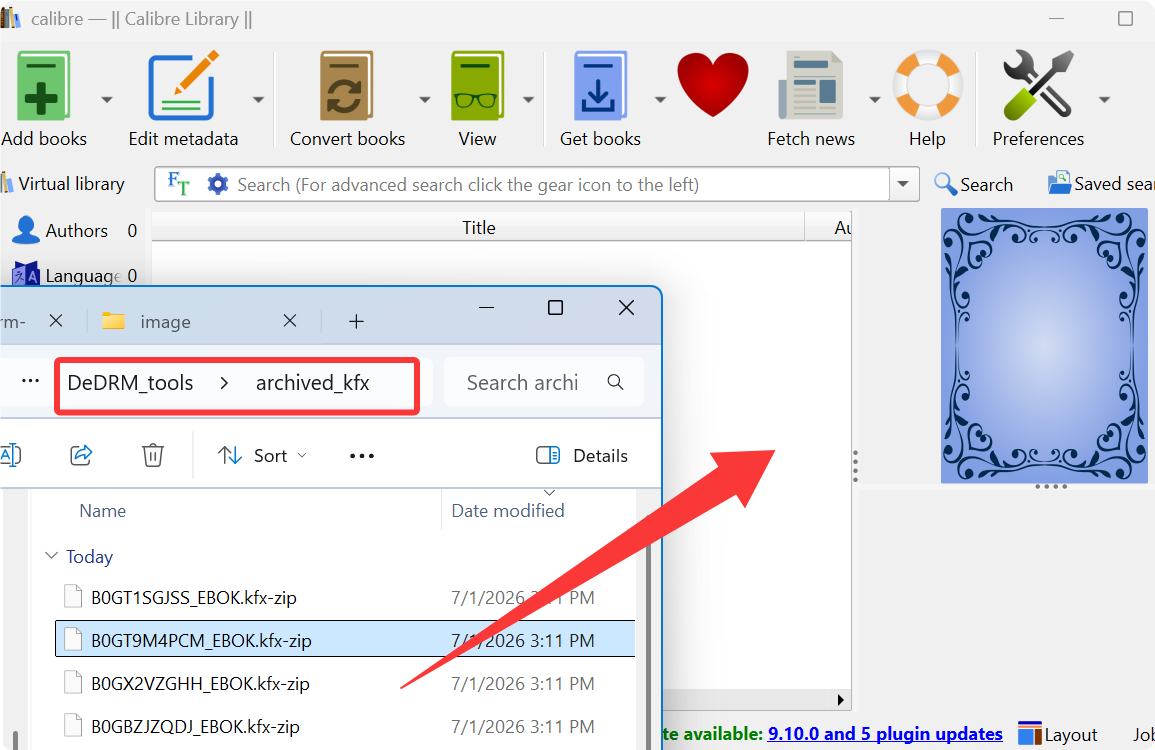
Unzip the DeDRM tools archive onto your PC. Inside the extracted folder, look for a specialized executable file named MSIXKFXArchiverMobi1_XXXX.exe. Run the MSIXKFXArchiver to extract kindle books as kfx-zip files. The extracted kfx-zip file will be stored in a newly generated folder named archived_kfx.
Step3: Convert kfx-zip to drm-free kfx files.
Download Calibre and install kfx-input plugin to calire.
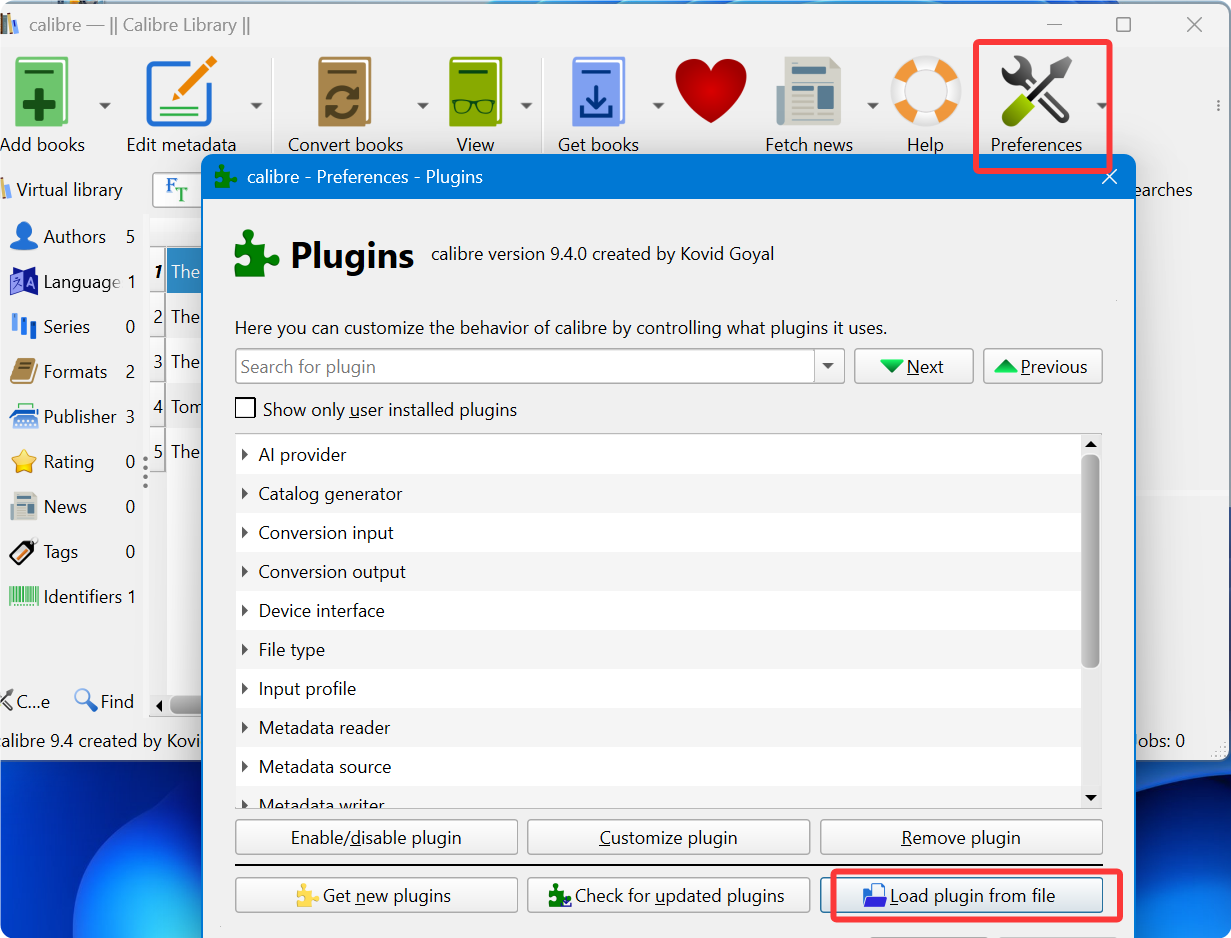
Drag the kfx-zip files into the main Calibre library window. The KFX Input plugin will instantly convert the kfx-zip files to kfx file.
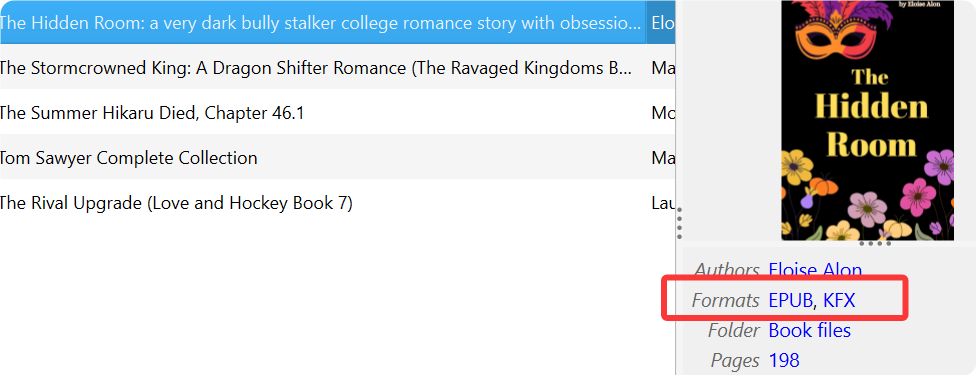
Now you can convert kindle kfx files to epub or pdf files with no drm. If your need more detailed instructions, please read How to Convert Kindle KFX-ZIP to PDF and EPUB with Calibre dedrm plugins.
Video tutorial on dedrm Microsoft Store Kindle App
1: Dedrm Kindle for PC 2.9.1 with Calibre KFXArchiver.exe + Dedrm Plugin (Legacy Kindle4PC solution)
- 1. Download the DeDRM plugin v10.0.20 and KFX-Input.zip.
- 2. Extract DeDRM_tools.zip and locate KFXArchiver291.exe. Copy this file to:
C:\Users\yourusername\AppData\Local\Amazon\Kindle\application - 3. Create a folder named "output_folder" in the same application directory.
- 4. Open Command Prompt in the application folder and run the following command:
KFXArchiver291.exe "C:\Users\User\Documents\My Kindle Content" output_folder output.k4i
Change the username to your computer username. - 5. The Kindle books will be extracted and saved to output_folder.
- 6. Ensure the above two plugins are installed in Calibre. Then drag the generated kfx-zip files (in output_folder) into Calibre to remove DRM.
- 7. Finally, convert the decrypted Kindle books to EPUB format, since KFX is not supported by any eReader except the Kindle app itself.
Make sure your Kindle books have been downloaded using Kindle for PC 2.9.1.
Watch the video tutorial to learn how to crack kindle for pc 2.9.1 with Calibre dedrm plugin
If you are using the dedrm plugin v10.0.20, you will find the KFXArchiver291.exe instead if the KFXArchiver282.exe mentioned in this video. But the steps are almost the same.
2: Dedrm Kindle for PC 2.8.0 with Calibre Kindlekeyextractor.exe + Dedrm Plugin
Download your tools first: Calibre 8.13 , DeDRM v10.0.14, KFX Input v2.26
For reference, I’m running Windows 11 (64-bit) with Calibre v8.13, DeDRM v10.0.14, and KFX Input v2.26 installed.
1. Download the latest version of Calibre and install it to your computer.
2. Download Calire dedrm plugin and unzip it.
Unzip it and you'll see the DeDRM_tools.zip and KFXKeyExtractor28.exe file.

3. Download the latest KFX Input Plugin.
This plugin enables Calibre to process and convert KFX-format eBooks into various formats such as PDF, EPUB, AZW3, DOCX, MOBI, ZIP, and more.
Install DeDRM plugin to Calire
Open Calibre, navigate to Preferences > Plugins, and click Load plugin from file. Then select the downloaded DeDRM_plugin.zip file and confirm to complete the installation.

Install KFX Input Plugin to Calire
Repeat the same steps to install the Kindle KFX Input plugin in Calibre. Then restart Calibre to apply the changes.

Copy KFXKeyExtractor28.exe to the Kindle app installation folder (for Kindle for PC v2.8.0)
Install the kindle for PC v2.8.0 to your PC first.
Can I download another version of Kindle for PC? No, you cannot. Currently, the Calibre DeDRM plugin and KindleKeyExtractor28.exe only work with Kindle for PC version 2.8.0. Using any other version will cause the DRM removal process to fail.
After installation, locate KindleKeyExtractor28.exe in the DeDRM plugin folder you downloaded at the very beginning, and copy it to the Kindle application folder. You can open this folder by right-clicking the Kindle desktop icon and selecting Open file location. And its default location is :c:\Users\ username\AppData\Local\Amazon\Kindle\application.
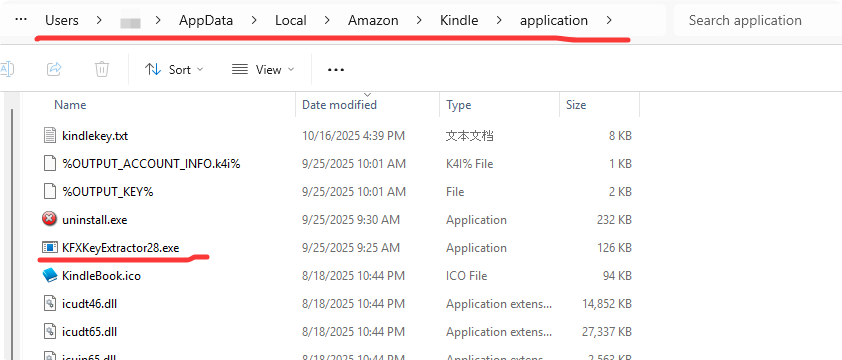
Download Kindle books via kindle for PC 2.8.0
Now you can download your kindle books via kindle for PC 2.8.0.
Extract kindle key file with the Command line and KFXKeyExtractor28.exe
Launch the Command Prompt and execute the following command:
C:\Users\username\AppData\Local\Amazon\Kindle\application\KFXKeyExtractor28.exe "C:\Users\username\Documents\My Kindle Content" kindlekey.txt kindle_account.k4i

If you have changed the location of your Kindle content, please contact us at support@imelfin.com, and we will assist you in correcting the command line.
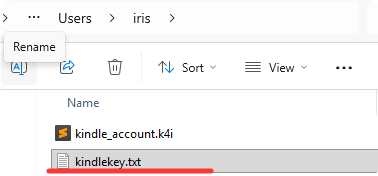
Once completed, you can navigate to your user folder to locate the kindlekey.txt file.
Cannot generate kindlekey.txt files? The tool shows messages like “Found sought after function” and “Got offset”, but no kindle_account.k4i file is created. Why?
I downloaded and installed Kindle 2.8.0, ran KFXKeyExtractor28.exe using command prompt but could not generate the kindle_account.k4i and keyfile. I'm running Windows 11 24H2. This is the error I got:
This usually indicates a permission-related issue rather than a failure of the extraction process itself.
When Kindle for PC is installed under C:\Program Files (x86)\, Windows UAC restrictions may prevent the extractor from accessing the required process data or writing the output key file unless it is run with administrator privileges.
You can follow the steps below to fix it.
- Move KFXKeyExtractor28.exe to a non-system directory.
- Right-click the executable and select Run as administrator.
- Re-run the extraction command using the full path to your Kindle content folder.
- Check the same directory for the generated kindle_account.k4i file.
If the file is still not generated after following these steps, please just use the best calibre dedrm plugin --imelfin eBook Ultimate.
-Customize the DeDRM Plugin and Add Extracted Key Files to Calibre
1. Open Calibre, go to Preferences > Plugins, and select DeDRM Plugin v10.0.14. Click Customize Plugin.
2. Under Kindle for Mac/PC ebooks, click Import Existing Keyfiles and add the kindle_account.k4i file.
3. Next, select the textbook icon under Kindle for Mac/PC ebooks and add the kindlekey.txt file.
4. Apply the changes and restart Calibre to complete the customization.

Note: You must extract the Kindle key and add the corresponding kindlekey file to Calibre each time you download new books that require decryption.
Dedrm Kindle & Convert Kindle kfx to epub, pdf
Now you can locate your Kindle books and drag them into Calibre. The Kindle DRM will be removed automatically. You will obtain KFX-format Kindle books, which are not directly readable. To make them accessible, click Convert, choose your desired output format such as EPUB or PDF, and convert your Kindle books accordingly.

3: Dedrm Kindle device with Calibre dedrm plugin V10.0.18
Download the Calibre dedrm plugin and the KFX Input plugin.
Step 1: Install dedrm pluigin and kfx input plugin as the method above.
Step 2: Customize the dedrm plugin.
To customize the DeDRM Plugin and input your Kindle Serial Number (KSN), you simply need to configure it inside Calibre. Open Calibre and go to Preferences >> Plugins, then locate the DeDRM plugin under “File type plugins” and click Customize plugin. In the configuration window, choose the section for eInk Kindle ebooks, where you can add your Kindle Serial Number. Enter the KSN exactly as it appears (without spaces), save the settings, and restart Calibre to apply the changes.
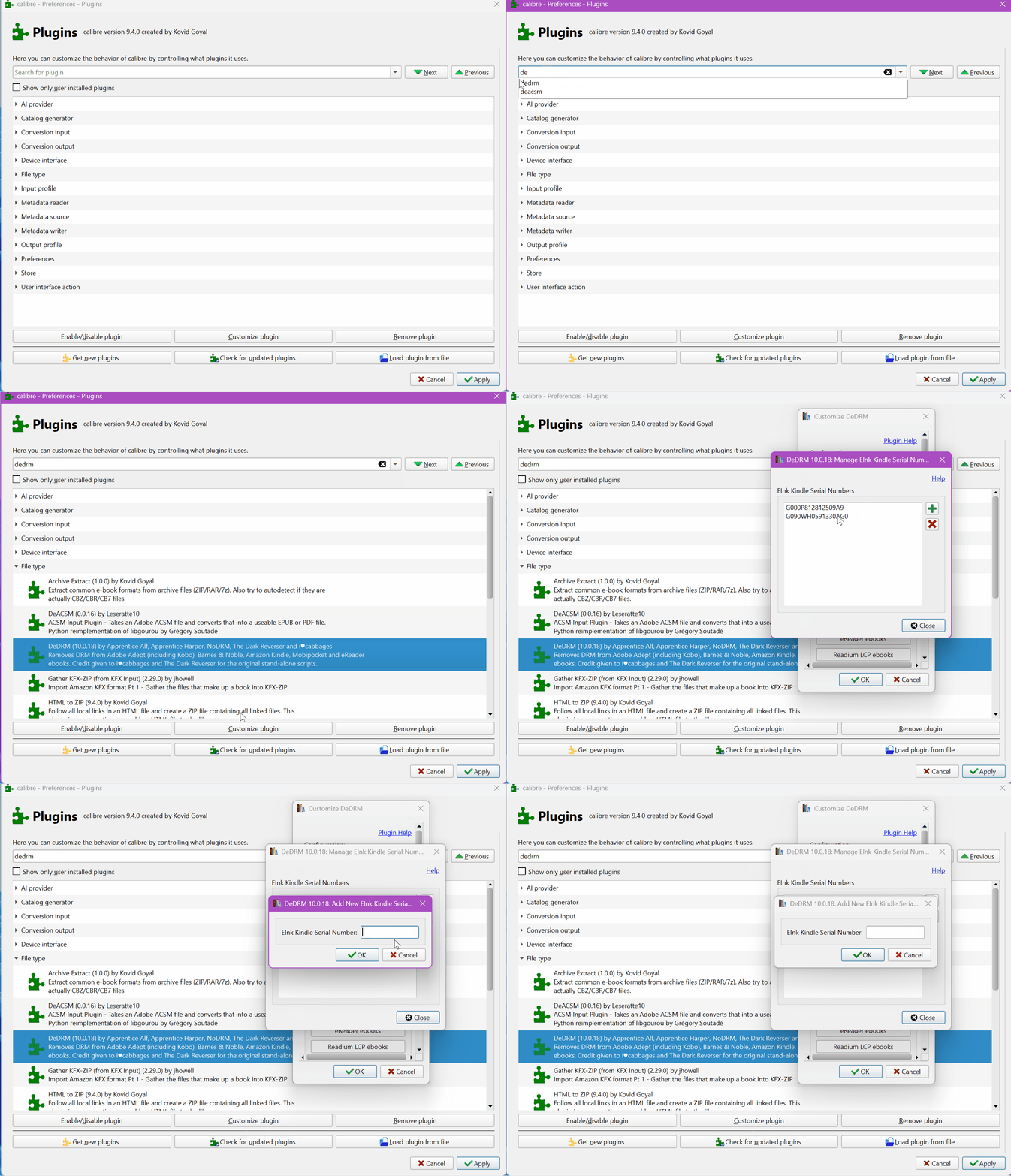
Step 3: Remove drm from kindle eink device.
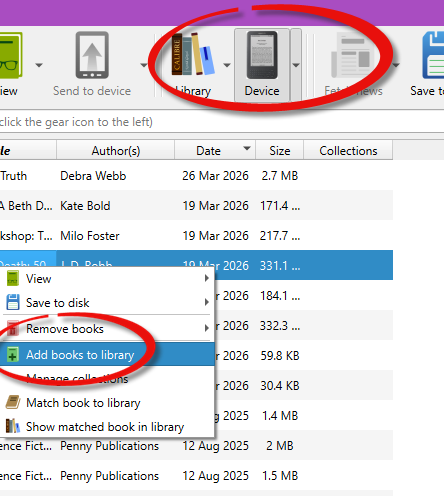
Once configured, any Kindle books downloaded for that specific device can be imported into Calibre, and the DRM will be removed automatically. Plug the Kindle device into Calibre, click the device icon, select the book you want to remove DRM from, and then click "Add books to library." The book will be added to Calibre, and the Kindle DRM will be removed.
Watch video tutorial to remove drm from kindle device
4: Troubleshooting: Calibre Kindle KFX Key Extractor Not Working
If the KFX key extractor runs but doesn’t produce a usable key file, it usually comes down to permissions, the Kindle for PC version, or how the account is set up. The sections below cover the most common cases people run into.
Kindle kfx-zip error?
There is still a possibility that you may obtain a “KFX-ZIP” file instead of a KFX file. If you receive a Kindle KFX-ZIP file, it means the DRM removal process for the Kindle book has failed.

Why might DRM removal fail even if you followed the instructions carefully? Several factors could be responsible, such as an incorrectly generated key, the Kindle key file not being imported properly, or other unforeseen issues. Nonetheless, if you follow the instructions step by step, you should be able to remove DRM from Kindle books downloaded via "Kindle for PC 2.8.0".
Why do I get a “keyfile not found” error?
This usually happens because the extractor cannot write the output file.
- Do not run the extractor from system-protected folders like
Program Files. - Move the extractor to a folder with write permissions, for example
C:\Download\. - The key file will be created in the same folder where you run the command.
Why does the log show “Got offset” but no .k4i file is generated?
This usually indicates a permissions issue or that your Kindle for PC version is unsupported.
- Run the extractor as Administrator, especially if Kindle is installed under
C:\Program Files (x86)\. - Use the full path to your Kindle content folder instead of short paths like
MYKIND~1. - Make sure you are using Kindle for PC 2.8.0 (70980). Other K4PC versions may not work.
Why do I see “Could not get account tokens from storage”?
This means the extractor cannot find usable account data on your Kindle for PC installation.
- Make sure you are logged into your Amazon account in Kindle for PC.
- Download at least one book to your local library.
- Open a book once in Kindle for PC before running the extractor.
Why do I get errors with KF8 or MOBI books?
Older books use a different encryption method, which may not work with the current extractor.
- For books published before April 2025, use Kindle for PC 2.4.0 or earlier with DeDRM 10.0.9.
- Alternatively, download a newer KFX book that uses account-based encryption, generate the
.k4ifile, and then use it for other books.
Do I need to re-extract keys for new books?
Yes. The key extractor only captures keys for books that are already downloaded.
- Run the extractor again whenever you download new books.
- The
.k4ifile accumulates keys, so you can keep the same file and just update it.
Is there an easier way to remove Kindle DRM in 2026?
Consider using "imElfin eBook Ultimate" — a simple tool capable of handling the latest Kindle DRM. Install the program, go to the Kindle tab, and drag your books to the right side to remove DRM effortlessly.
The detailed guide:
1. How to remove kindle drm on Windows.
2. How to remove kindle DRM on Mac.