Music Tools for Windows
 Music Tools for Mac


Kindle File Formats & Kindle DRM Explained: The Complete 2026 Guide (AZW3, KFX, EPUB)
Learn the differences between KFX, AZW3, and MOBI, understand how Kindle DRM works, and discover why EPUB is now the best format for your device.
Understanding the Kindle ecosystem requires navigating two layers: the File Format (the container and layout) and the DRM Type (the encryption layer). As Amazon sunsets older software versions and transitions to 64-bit architecture, staying informed is vital for every power user.
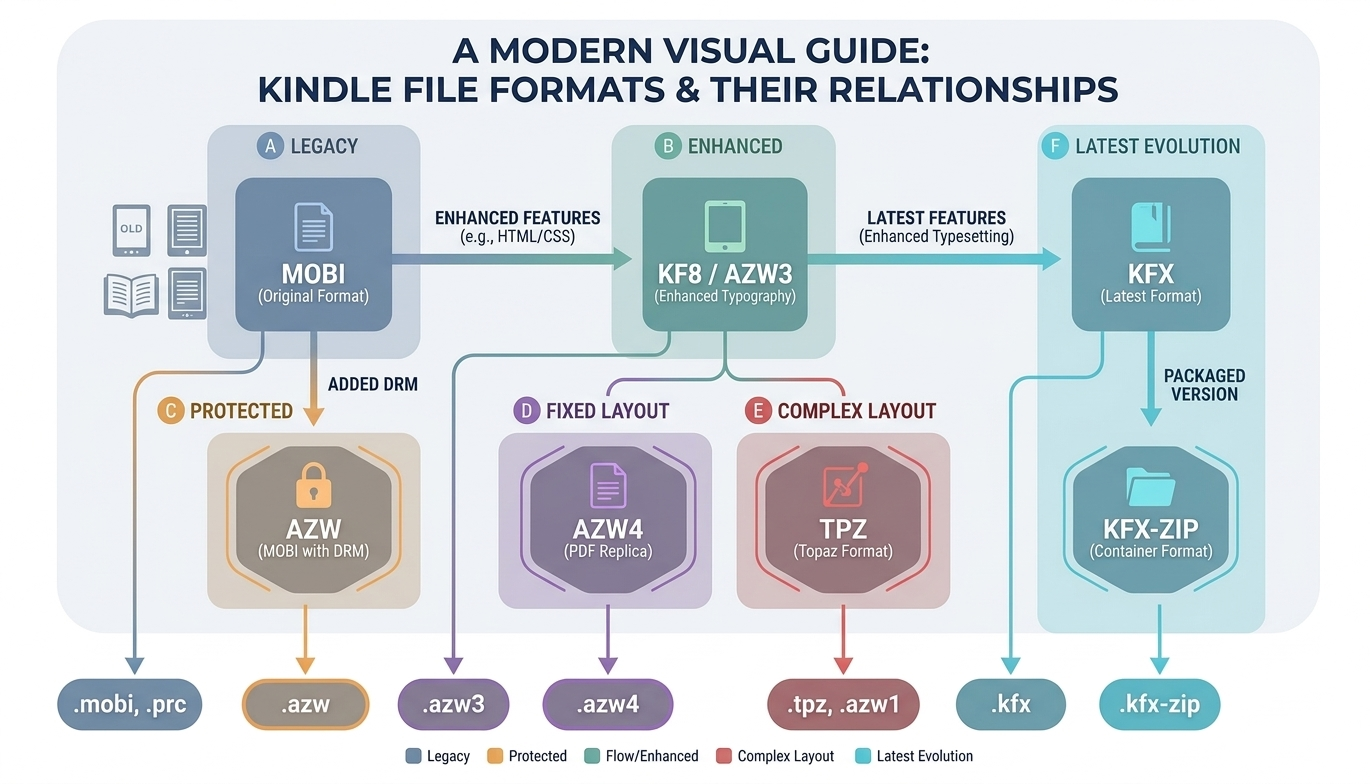
1. Native Kindle File Formats: From Legacy to KFX
Amazon utilizes several proprietary formats, each optimized for different generations of E-ink hardware.
1. KFX (Kindle Format 10)
KFX is the most advanced format, designed for "Enhanced Typesetting." It is not a single file but a bundle of assets packaged in a .kfx-zip or .kfx container.
• Technology: Based on Amazon’s Ion binary format.
• Key Features: Enables high-quality typography, intelligent justification, and Bookerly font optimizations.
2. AZW3 (Kindle Format 8 / KF8)
The successor to MOBI, AZW3 brought modern web standards to e-readers.
• Technology: A compiled HTML5/CSS3 structure.
• Key Features: Supports nested tables, sidebars, and fixed layouts.
• DRM: Usually protected by Kindle DRM.
3. MOBI & AZW (Legacy)
MOBI is the original format based on Mobipocket. When DRM is applied, it becomes AZW.
• Status: Deprecated. Amazon no longer accepts new MOBI uploads via "Send to Kindle."
• Limitations: Limited formatting and low-resolution image support.
4. AZW4 (Print Replica)
Print Replica is Amazon's format for representing PDFs in the Kindle ecosystem. It's essentially a PDF wrapped in an Amazon container.
• Technology: Contains a PDF that preserves the original document's layout. Fixed layout that doesn't reflow like other Kindle formats.
• DRM: After DRM removal, a standard PDF can be extracted.
5. TPZ / AZW1 (Topaz)
A unique format that stores glyph images and OCR text. Topaz is a PDF wrapped in an Amazon container, used for textbooks to preserve fixed layouts.
• Technology: Contains images of glyphs with positional informatison. Includes OCR text for searching.
• DRM: Can be converted to HTML/SVG after DRM removal.
2. Kindle DRM & Kindle File Type Relations
| Format | File Extension | DRM Type |
|---|---|---|
| MOBI / AZW | .mobi, .azw | Legacy Kindle DRM |
| KF8 (AZW3) | .azw3 | Modern Kindle DRM (mobidedrm) |
| KFX | .kfx, .kfx-zip | KFX DRM |
| Print Replica | .azw4 | PDF-Wrapper DRM |
| Topaz | .tpz, .azw1 | Topaz Glyph DRM |
3. Kindle file formats--Supported Personal Documents
For non-Amazon content, the "Send to Kindle" service is the most efficient way to manage your library.
EPUB (.epub):
The industry standard. Though not "native," it is the best format to send to Amazon, as it converts cleanly to AZW3/KFX.
PDF (.pdf):
Supported directly but lacks reflowable text. Best for large-screen devices like the Kindle Scribe.
DOC/DOCX:
Supported for simple manuscripts, though complex layouts may break.
Images & Text:
Supports .jpg, .png, .gif, and .txt.
4. Kindle File Types FAQs
What format does Kindle use natively?
Kindle mainly uses AZW3 and KFX. These formats are optimized for E-ink devices and support advanced layout, typography, and DRM when needed.Can Kindle read EPUB files?
Yes. You can send EPUB files to Kindle via the "Send to Kindle" service. Amazon converts them into the device's internal format (usually AZW3) for a smooth reading experience.
Why won’t my MOBI file upload to Kindle?
Amazon has stopped accepting new MOBI uploads. While existing MOBI books in your library still work, you must convert new MOBI files to EPUB before sending them to your device.
What’s the best file format for Kindle reading?
For most books, EPUB is the best starting point because it converts natively and stays reflowable. For dense documents with complex layouts, a well-prepared PDF is better, especially on larger screens.
How do I convert a PDF into something Kindle can reflow?
A reliable path is to convert the PDF to a Word document (.docx) using a tool like Smallpdf, adjust the layout/font in Word, and then send the DOCX to your Kindle. The device will then treat it as a reflowable document.
What’s the maximum file size Kindle accepts via Send To Kindle?
Send to Kindle supports files up to 200 MB. If your file is larger, you should compress it or use a USB transfer to move it directly to your Kindle’s storage.
Are my files safe when using online converters before sending?
Reputable services use TLS encryption for files in transit and remove them from servers shortly after processing. This allows you to prepare sensitive documents for Kindle reading without long-term online storage.
How does the Kindle for PC sunset affect my files?
With the sunset of Kindle for PC version 2.9.x (scheduled for June 30, 2026), Amazon is moving toward 64-bit architecture. This often defaults downloads to the KFX format, which requires updated tools for backup and management.